Step 5 of 29 · Your first day
A person who is not cleared
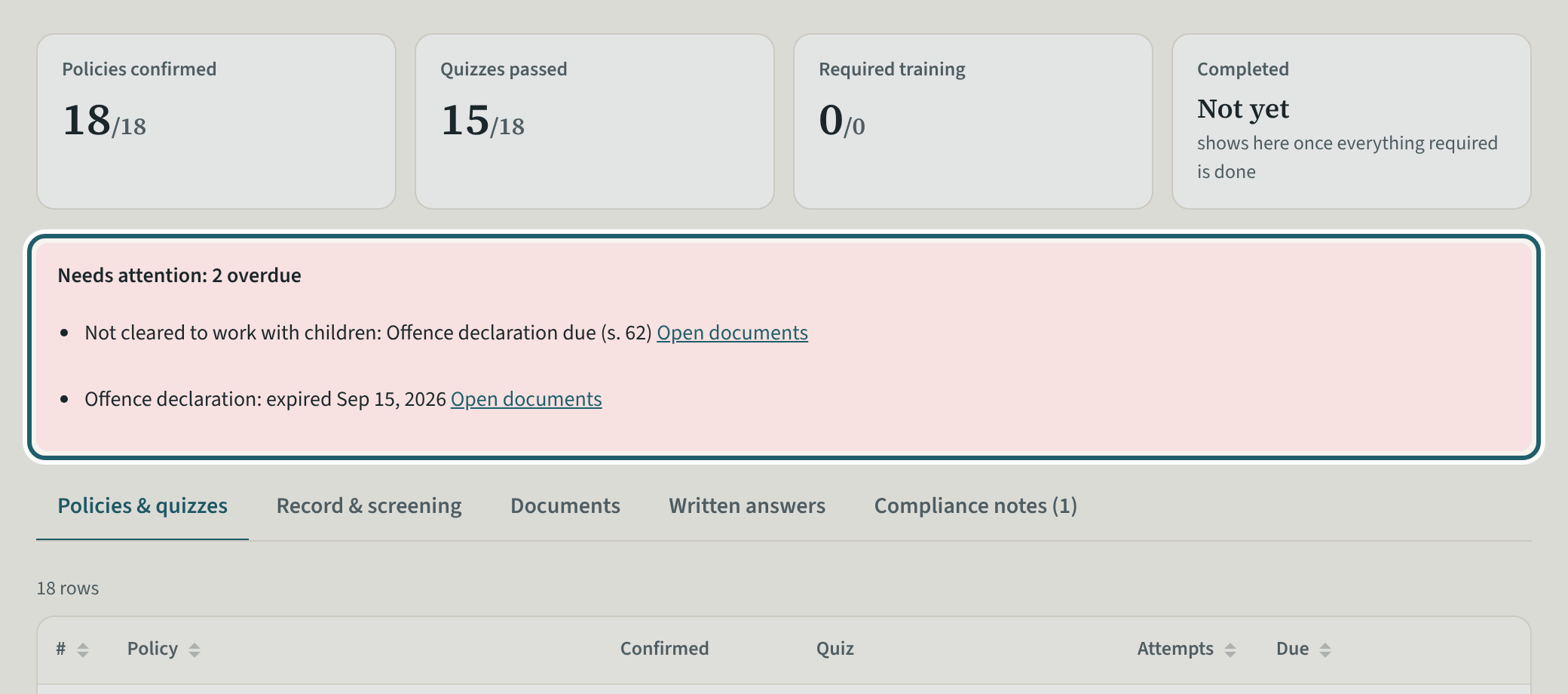
Open the person: the callout says why they are not cleared and what to do; the pills say In progress and Not cleared to work with children.
Watch out: A person not cleared still signs in and reads their policies; the room tablet says "Not cleared yet" beside their name and asks the supervisor before they are counted or left alone.
More about this
A vulnerable sector check before a person begins (O. Reg. 137/15, s. 60(1)), a new one on or before every fifth anniversary and an offence declaration in every calendar year in between, no later than 15 days after the anniversary (s. 62(1) and (2)); standard first aid with infant and child CPR for everyone who may be counted in the ratio (s. 58(2)); a health assessment and immunization before employment (s. 57(1)). KeepCount reads the verified documents and says whether the person is cleared to work with children and cleared to count in the ratio; the callout lists each gap with its section and a link to the documents.
A person who is not cleared still signs in and reads their policies; the room tablet says "Not cleared yet" beside their name and asks the supervisor before they are counted or left alone with the children. Your screening policies say what measures protect the children while a check is outstanding (s. 65(e)).
"Send reminder" emails the person the policies, quizzes and training still outstanding; "Print record" prints their file for the binder; "Edit details" changes their contact details, start date and remarks (the Rooms card on the record sets their rooms); "Remove access" ends their access when they leave: they can no longer sign in and their phone number and address are removed, while their name, acknowledgements, quiz results, training, screening and documents stay on file for the retention period (three years); "Deactivate" only pauses a sign-in, and "Reactivate" lets the person back in. "Lock this person" is for a lost phone or a login that someone else used: it blocks the login now, signs the person out on every device, stops their alerts and, after a lost device or misuse, removes their authenticator app and passkeys, unless the person also belongs to another organization: then KeepCount support removes them. An owner or administrator uses "Set up again" on a locked person to let them back in; they get an email and set the authenticator up anew.
Your centre's words for people and its policies may differ; the screens are the same. The screen is from KeepCount 0.99.162, captured October 29, 2026 in a demonstration organization: everyone in it is fictional. Section numbers are O. Reg. 137/15 (General) under the Child Care and Early Years Act, 2014, read on e-Laws on October 20, 2026. This explains how KeepCount works; it is not legal advice, and the Ministry's program advisors decide compliance.