Step 5 of 26 · Your first day
Tick each item and record
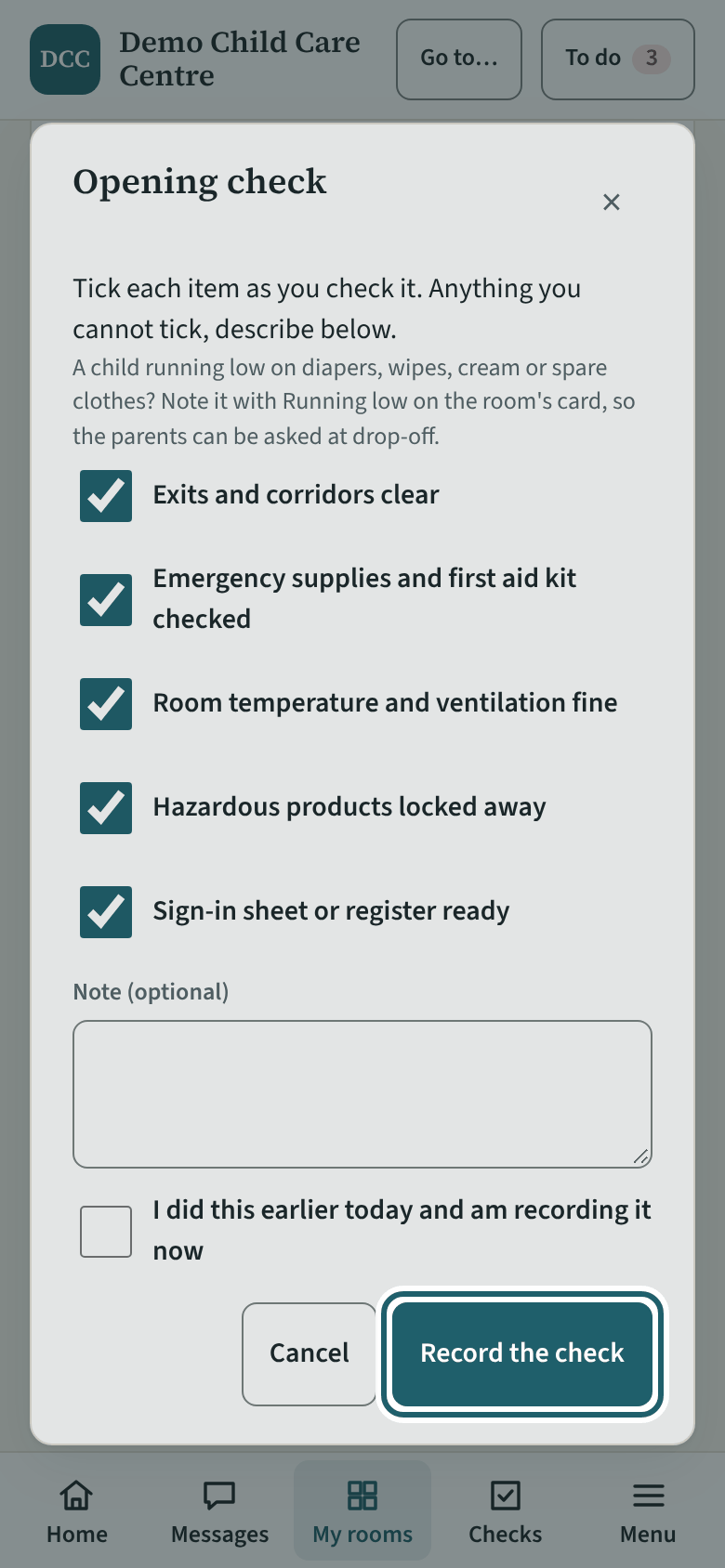
Tick each item as you check it. Anything you cannot tick, describe in the box. Then tap "Record the check".
Watch out: Never tick what you did not check: say what you found instead, and the supervisor sees it on the checks board. The record is read at the next licensing visit.
More about this
The items are your centre's own list; the demonstration's opening check reads "Exits and corridors clear", "Emergency supplies and first aid kit checked", "Room temperature and ventilation fine", "Hazardous products locked away", "Sign-in sheet or register ready". If you cannot tick one, say what you found in "What was found, or not checked": the button then reads "Record with an issue", and the supervisor sees the issue on the checks board.
"I did this earlier today and am recording it now" is for a check done on paper first; the record keeps both times.
Your centre's words for people and its policies may differ; the screens are the same. The screen is from KeepCount 0.99.144, captured October 27, 2026 in a demonstration organization: everyone in it is fictional. Section numbers are O. Reg. 137/15 (General) under the Child Care and Early Years Act, 2014, read on e-Laws on October 20, 2026. This explains how KeepCount works; it is not legal advice, and the Ministry's program advisors decide compliance.