Step 9 of 14 · Your first day
Reminders and the record
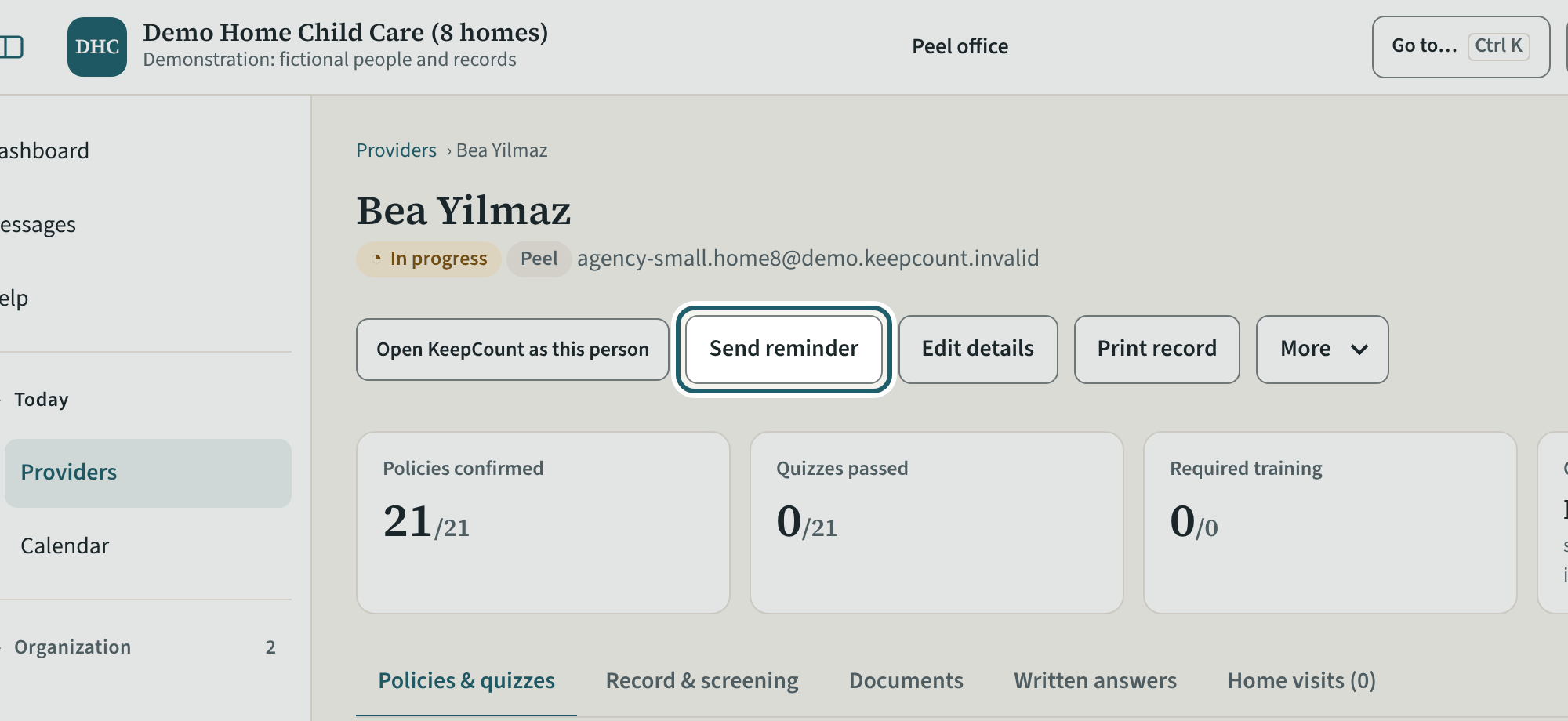
On a record: Send reminder, Print record, Edit details, and under More Change sign-in email and Deactivate.
Watch out: "Deactivate" only pauses a sign-in; "Remove access" is for someone who has left, and the records stay for three years after they are made.
More about this
"Send reminder" emails the provider the policies to confirm, quizzes and training still outstanding. "Print record" prints the provider's file, with who printed it. "Edit details" changes their contact details, start date and remarks. Under "More", "Change sign-in email…" changes the address the person signs in with, and the person confirms the new address; "Deactivate" pauses a sign-in, and "Reactivate" on the inactive record lets the person back in. When someone leaves, the inactive record shows "Leaving…?": records of training and screening are kept for three years after they are made (O. Reg. 137/15, s. 82), so use "Remove access" when someone leaves; "Delete" only becomes possible after the retention date.
Your agency's words for people and its policies may differ; the screens are the same. The screen is from KeepCount 0.99.191, captured November 2, 2026 in a demonstration organization: everyone in it is fictional. Section numbers are O. Reg. 137/15 (General) under the Child Care and Early Years Act, 2014, read on e-Laws on October 20, 2026. This explains how KeepCount works; it is not legal advice, and the Ministry's program advisors decide compliance.