Step 3 of 20 · Your first day
The dashboard
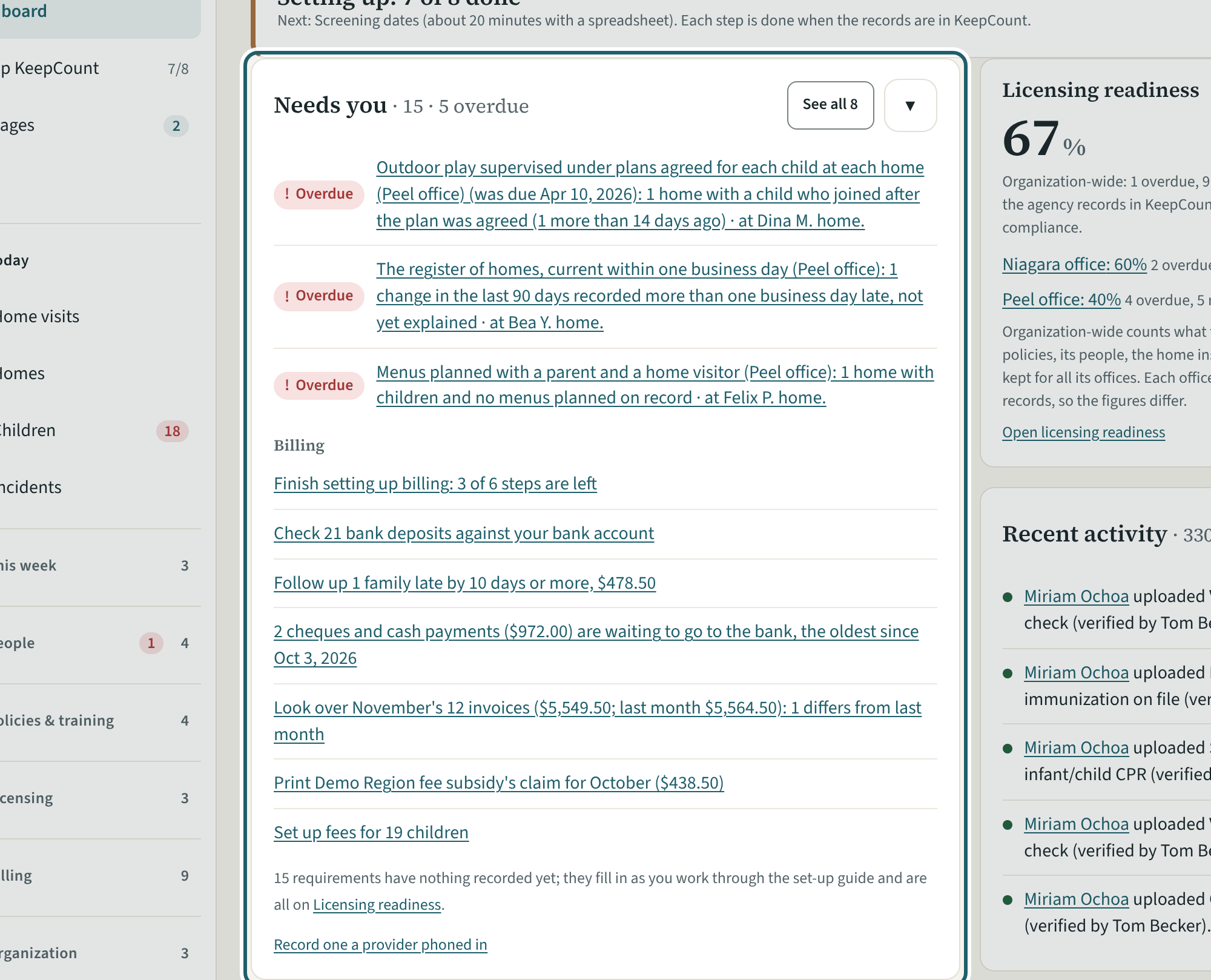
The dashboard: homes active, not inspected this quarter, due or late now, incidents open; then Needs you, Billing, the readiness score and recent activity.
Watch out: Needs you lists what is late or missing at any office, with the office and the home it is at. The Ministry decides compliance, not the score.
More about this
The four figures at the top count the agency's homes. "Needs you" lists the items that wait on someone, the most urgent first, each with its office and, where it concerns one, its home; "See all" opens the whole list. Under "Billing" are the things family billing asks of you this month, when it is on. "Licensing readiness" gives the agency's score and each office's. "Right now" and "Recent activity" show today's records and the latest changes. "Add provider" and "Record one a provider phoned in" are the shortcuts at the top and the foot.
Your agency's words for people and its policies may differ; the screens are the same. The screen is from KeepCount 0.99.191, captured November 2, 2026 in a demonstration organization: everyone in it is fictional. Section numbers are O. Reg. 137/15 (General) under the Child Care and Early Years Act, 2014, read on e-Laws on November 2, 2026. This explains how KeepCount works; it is not legal advice, and the Ministry's program advisors decide compliance.