Step 13 of 29 · Your first day
Approve it
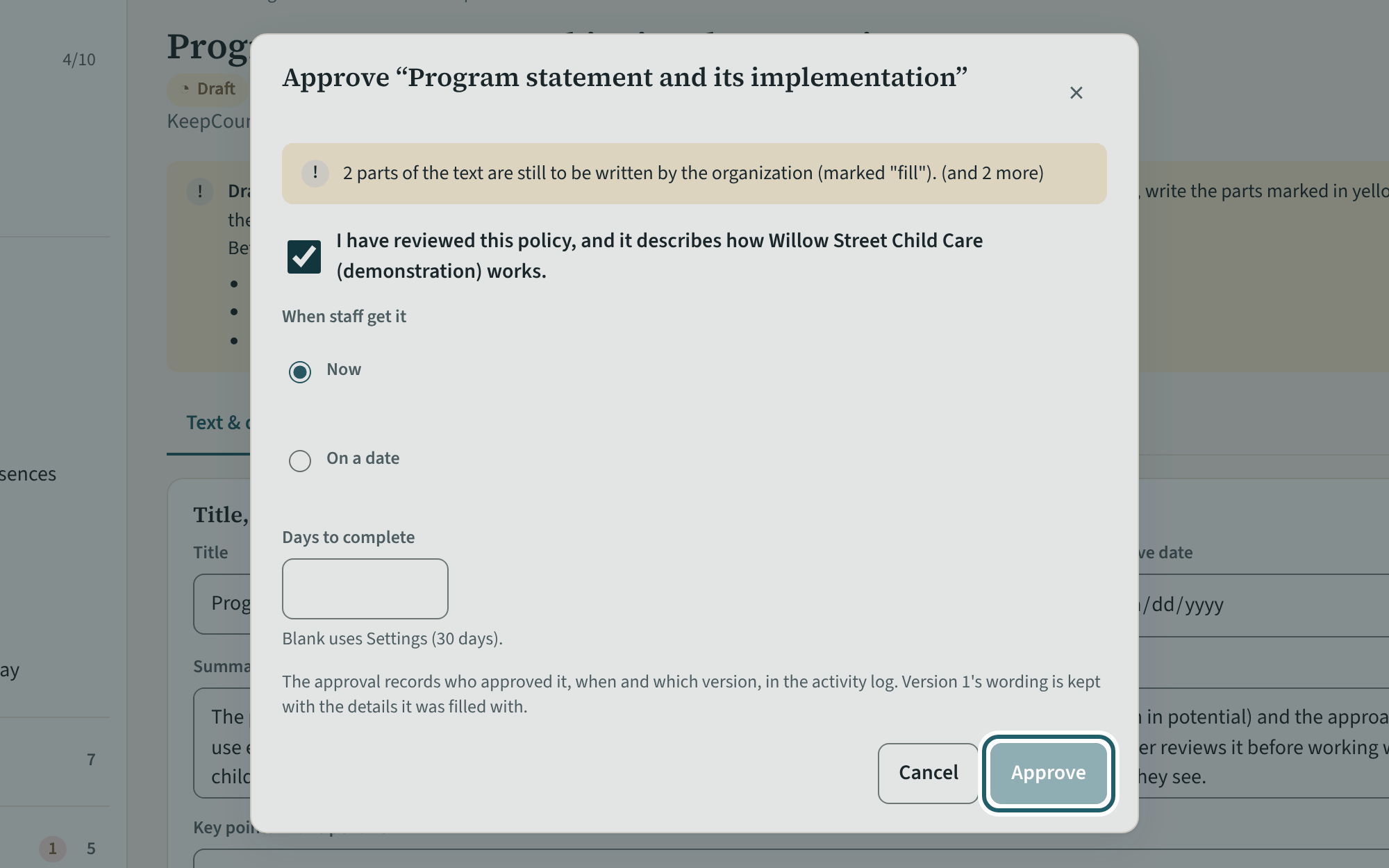
"Approve…": confirm "I have reviewed this policy, and it describes how the centre works", choose now or a date, set the days staff have to confirm, and approve.
Watch out: Approval asks you to confirm the policy describes how the centre works. Publishing a new version later asks everyone to confirm again.
More about this
Approval records who approved the policy and when, and the version; staff see it from that moment with its due date. The days to complete are the window before a confirmation shows as overdue on each person's record and under Needs you; the demonstration gives new staff 30 days. A policy approved "on a date" waits until then. The program statement must be reviewed at least annually (s. 46(1)); "Annual review…" on the list starts that cycle for every policy without changing their text.
Your centre's words for people and its policies may differ; the screens are the same. The screen is from KeepCount 0.99.162, captured October 29, 2026 in a demonstration organization: everyone in it is fictional. Section numbers are O. Reg. 137/15 (General) under the Child Care and Early Years Act, 2014, read on e-Laws on October 20, 2026. This explains how KeepCount works; it is not legal advice, and the Ministry's program advisors decide compliance.