Step 21 of 26 · Your first week
Say what happened
Say what happened, when and where, what you did, and who told the parent. Then tap "Record".
Watch out: Write what you saw, in order, with times, not what you think caused it. An injury also gets the accident report for the parent, at the end of the form.
More about this
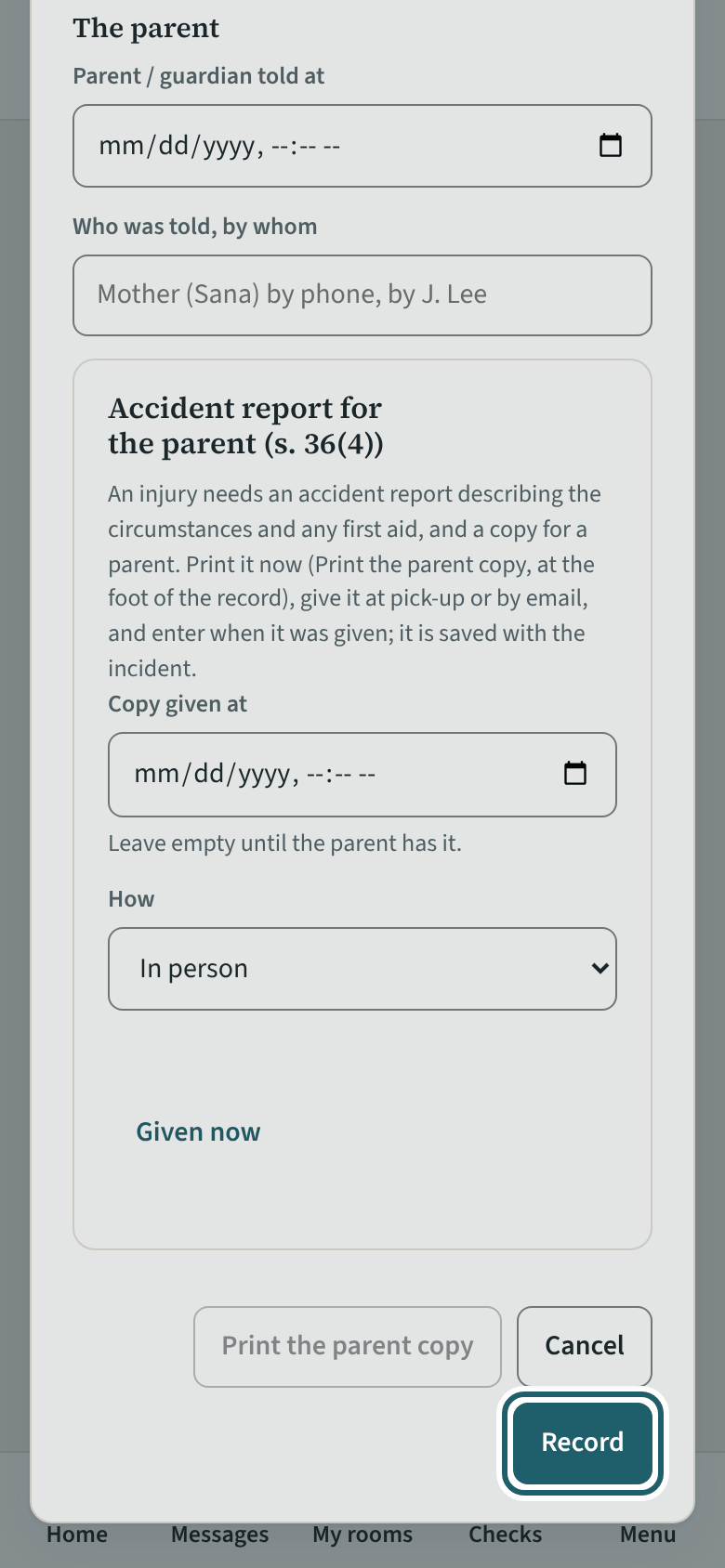
The form asks the kind of incident, when, the site, room and child, where exactly, what happened, the action taken and any first aid, witnesses, when the parent or guardian was told, and who told them.
An injury also needs an accident report: the regulation requires a report describing the circumstances of the injury and any first aid given, with a copy to a parent (s. 36(4)). "Accident report for the parent" at the end of the form prints the copy and records when it was given and how. You can edit an incident you recorded; every change is logged, so the record is never silently changed. Sign the report as you save it: tick "Sign this report as I save it" and type your name under the sentence "I wrote this report, and it is accurate to the best of my knowledge." The record and the parent copy then say who signed it in KeepCount and when; if the report is changed afterwards, it says so, and you can sign it again. The printed copy keeps lines for signatures in ink. A photo of the hazard goes to your supervisor, who keeps it with the incident.
Your centre's words for people and its policies may differ; the screens are the same. The screen is from KeepCount 0.99.144, captured October 27, 2026 in a demonstration organization: everyone in it is fictional. Section numbers are O. Reg. 137/15 (General) under the Child Care and Early Years Act, 2014, read on e-Laws on October 20, 2026. This explains how KeepCount works; it is not legal advice, and the Ministry's program advisors decide compliance.