Step 3 of 26 · Your first day
Choose your rooms for today
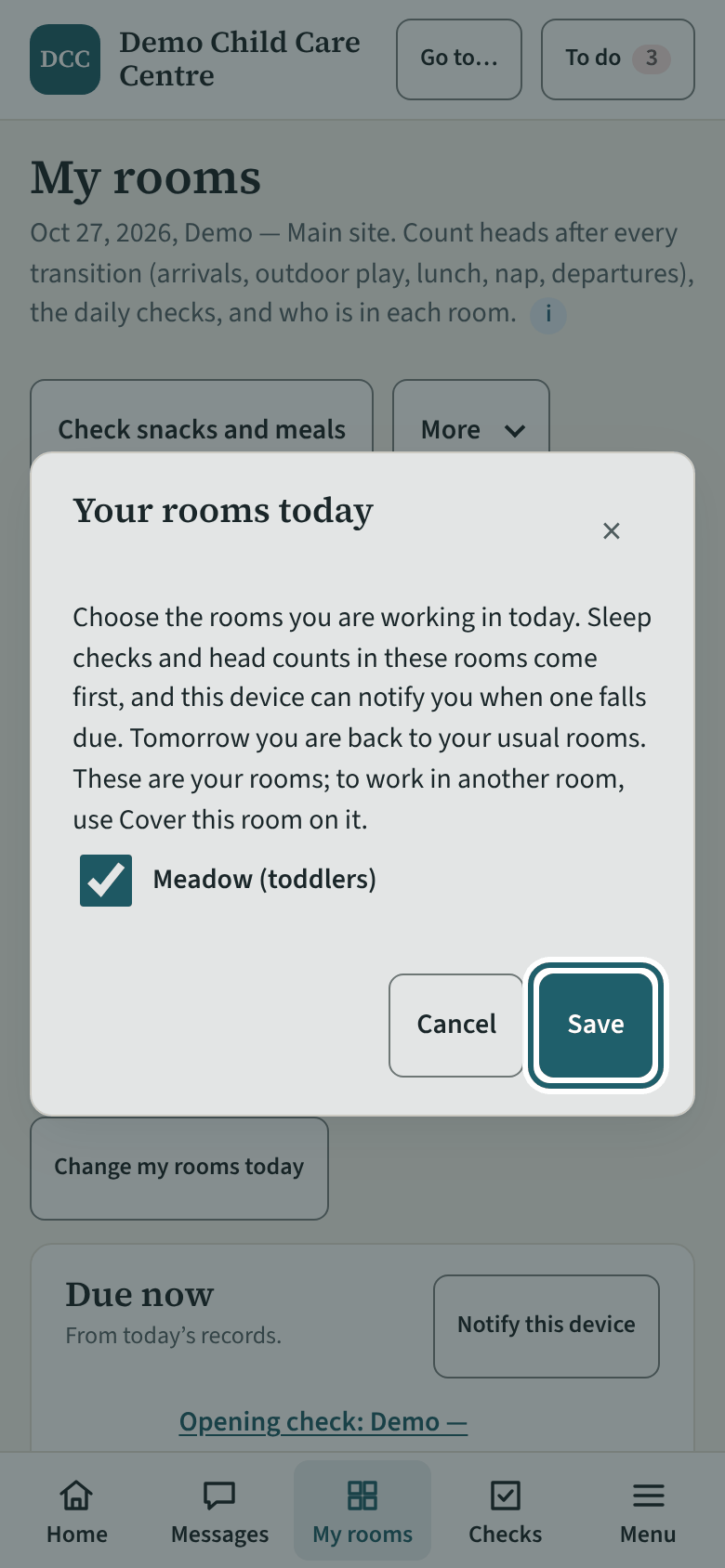
Your usual room is already set on My rooms. Somewhere else today? Tap "Change my rooms today", tick the room, Save. Tomorrow you are back to your usual room.
Watch out: To record in a room that is not yours (a break, a ratio cover), use "Cover this room" on its card instead: it asks the reason. Rooms at another site cannot be chosen.
More about this
The office gives you a usual room, and it shows under "Your rooms today". The dialog says: "Choose the rooms you are working in today. Sleep checks and head counts in these rooms come first, and this device can notify you when one falls due. Tomorrow you are back to your usual rooms. These are your rooms; to work in another room, use Cover this room on it." "Use my usual rooms" puts things back. On a day that is not one of your usual days, your own room shows as "Your room" with "I'm in … today": one tap and it is your room for the day; "Change" chooses others.
If you tick a second room, both rooms' checks and sleep checks come first on your Due now list, and you can record in either. "Notify this device" in the Due now box lets this phone or tablet tell you when a check or a sleep check in your room falls due. Covering another room is its own step, in your first week.
Your centre's words for people and its policies may differ; the screens are the same. The screen is from KeepCount 0.99.144, captured October 27, 2026 in a demonstration organization: everyone in it is fictional. Section numbers are O. Reg. 137/15 (General) under the Child Care and Early Years Act, 2014, read on e-Laws on October 20, 2026. This explains how KeepCount works; it is not legal advice, and the Ministry's program advisors decide compliance.