Step 2 of 26 · Your first day
Your home page
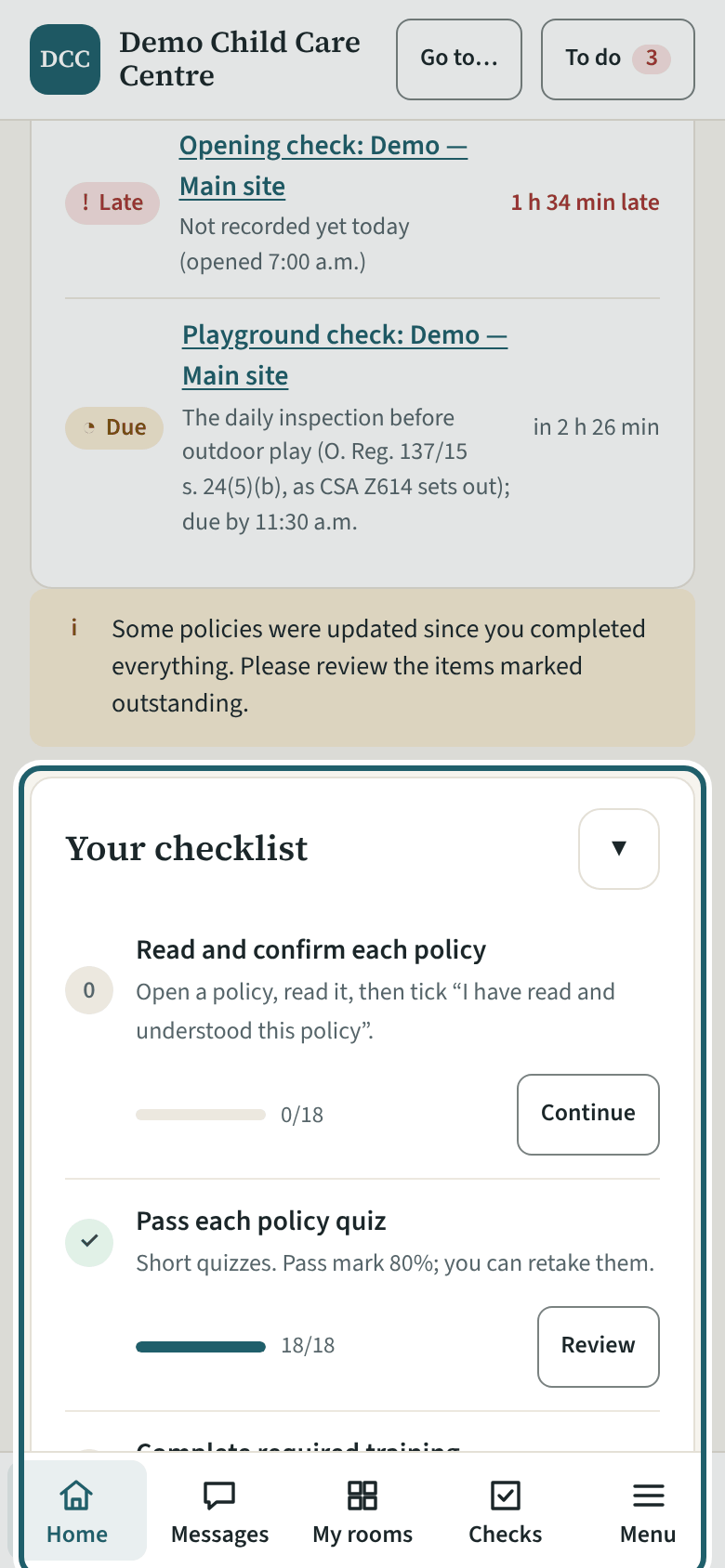
Your home page lists what the centre asks of you: policies to read and confirm, quizzes, training, and your screening documents, each with its due date.
Watch out: Until you confirm the policies, your room's card says "Not cleared yet" beside your name: ask the supervisor before you are counted in the ratio or left alone with the children.
More about this
"Your checklist" has three rows: read and confirm each policy, pass each policy quiz, complete required training. "Continue" takes you to the next thing to do; the list gets shorter as you go, and the office sees the same list. Below it, "What is due" lists every item by date, and "Your screening documents" shows the vulnerable sector check, offence declaration, first aid and the other documents the centre keeps for you, with the date each is due.
Messages from the office appear at the top of the page until you read them. "Due now" shows up to three things due in your rooms right now (an opening check not yet done, a sleep check due), with a link to the rest on My rooms.
Your centre's words for people and its policies may differ; the screens are the same. The screen is from KeepCount 0.99.144, captured October 27, 2026 in a demonstration organization: everyone in it is fictional. Section numbers are O. Reg. 137/15 (General) under the Child Care and Early Years Act, 2014, read on e-Laws on October 20, 2026. This explains how KeepCount works; it is not legal advice, and the Ministry's program advisors decide compliance.