Step 3 of 17 · Your first day
Today
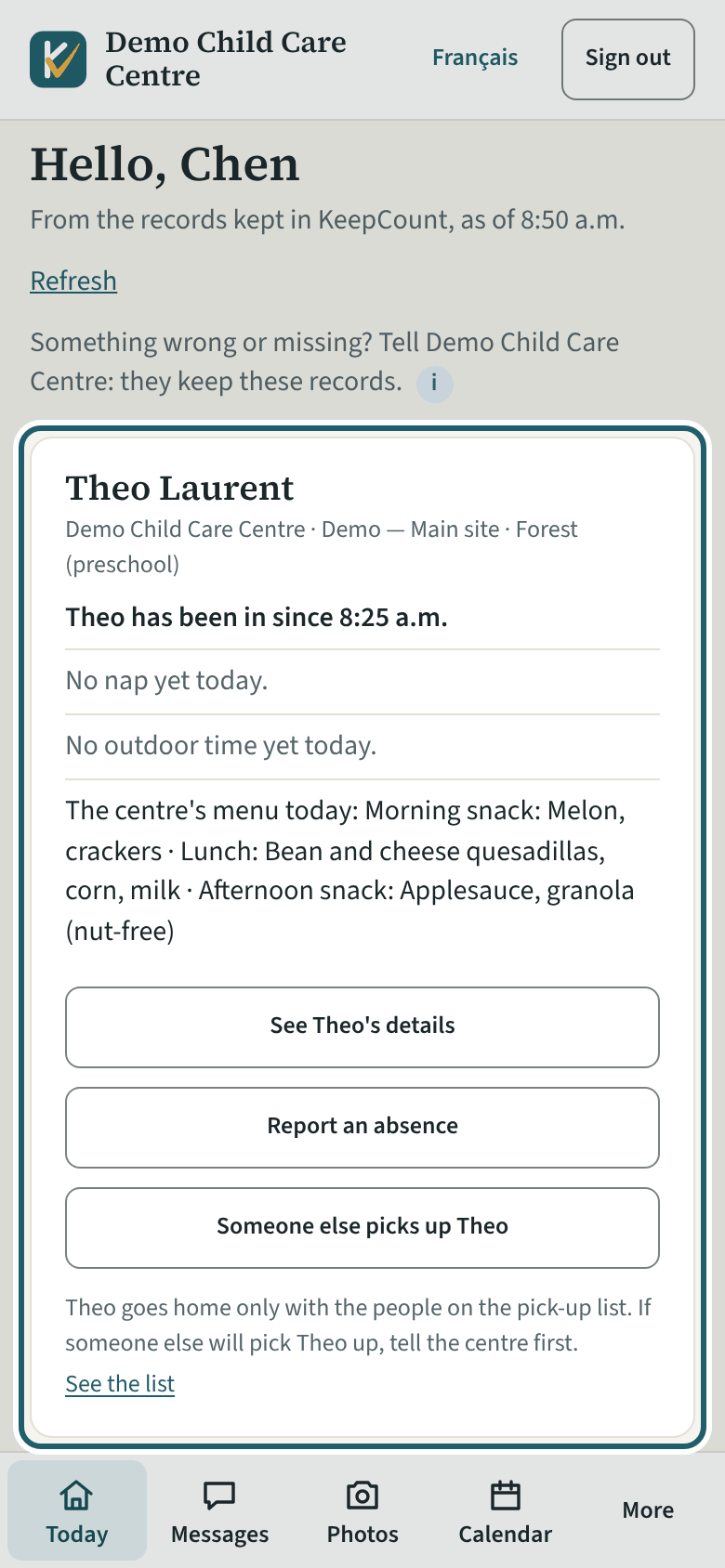
Hello: a card for each of your children with the centre, the site and the room, and today's lines: in since when, naps, outdoor time, the menu, photos.
Watch out: You see your own children only, as of the time shown. After an incident the card says a report was made; an accident report the centre sends you opens under Forms and reports.
More about this
The lines come from the records the staff keep during the day, as of the time shown under the heading; "Read again" reads them afresh. Until the room signs your child in, the card says no arrival is recorded for them yet today; then "has been in since", and at the end of the day "signed in at … and signed out at …". A nap shows once your child fell asleep and woke ("Slept 12:30 p.m. to 2:00 p.m."), or "Asleep since" while they sleep; outdoor time is the room's time outside while your child was there. The centre's menu for the day appears when your child was in, with any substitution in place of the item. Where the centre has switched it on, the times medication was given appear too. If an incident report was made and the centre has told the family, the card says so and asks you to speak to the centre: the report itself is not shown. "1 photo today" opens the photos. Under the lines, "See <your child>'s details" opens the file, "Report an absence" says your child will not come, and "Someone else picks up <your child>" writes a pick-up note to the room; the line under them says your child goes home only with the people on the pick-up list, and "See the list" opens it.
Where the centre or agency bills you through KeepCount and records you as paying for a child, one line about money sits under the children: "You owe $… by <date>", "$… will be taken from your bank on <date>", "Paid up, thank you" or "Credit $…, used on your next invoice", with "See the invoice" or "See your billing" when something is owed. It is the same sentence as at the top of Billing. Nothing shows if you pay for no child here, or if your centre or agency does not bill families through KeepCount.
You see your own children only: their arrivals and departures, naps, outdoor time, the menu, medication times and photos for today and the last month, their allergies and food restrictions, emergency contacts (names and relationships, when the centre switches them on), the pick-up list and the other family members with access. Never a staff member's record or another child. After an incident, the card says a report was made once the centre has spoken to a family member about it; an accident report the centre sends you by name opens under Forms and reports, for you to read. If you have children at more than one centre on KeepCount, each centre's cards sit under its name.
Your child's centre or agency may use other words for people and its own policies; the screens are the same. The screen is from KeepCount 0.99.171, captured October 30, 2026 in a demonstration organization: everyone in it is fictional. Section numbers are O. Reg. 137/15 (General) under the Child Care and Early Years Act, 2014, read on e-Laws on October 20, 2026. This explains how KeepCount works; it is not legal advice, and the Ministry's program advisors decide compliance.