Step 2 of 17 · Your first day
Signing in again
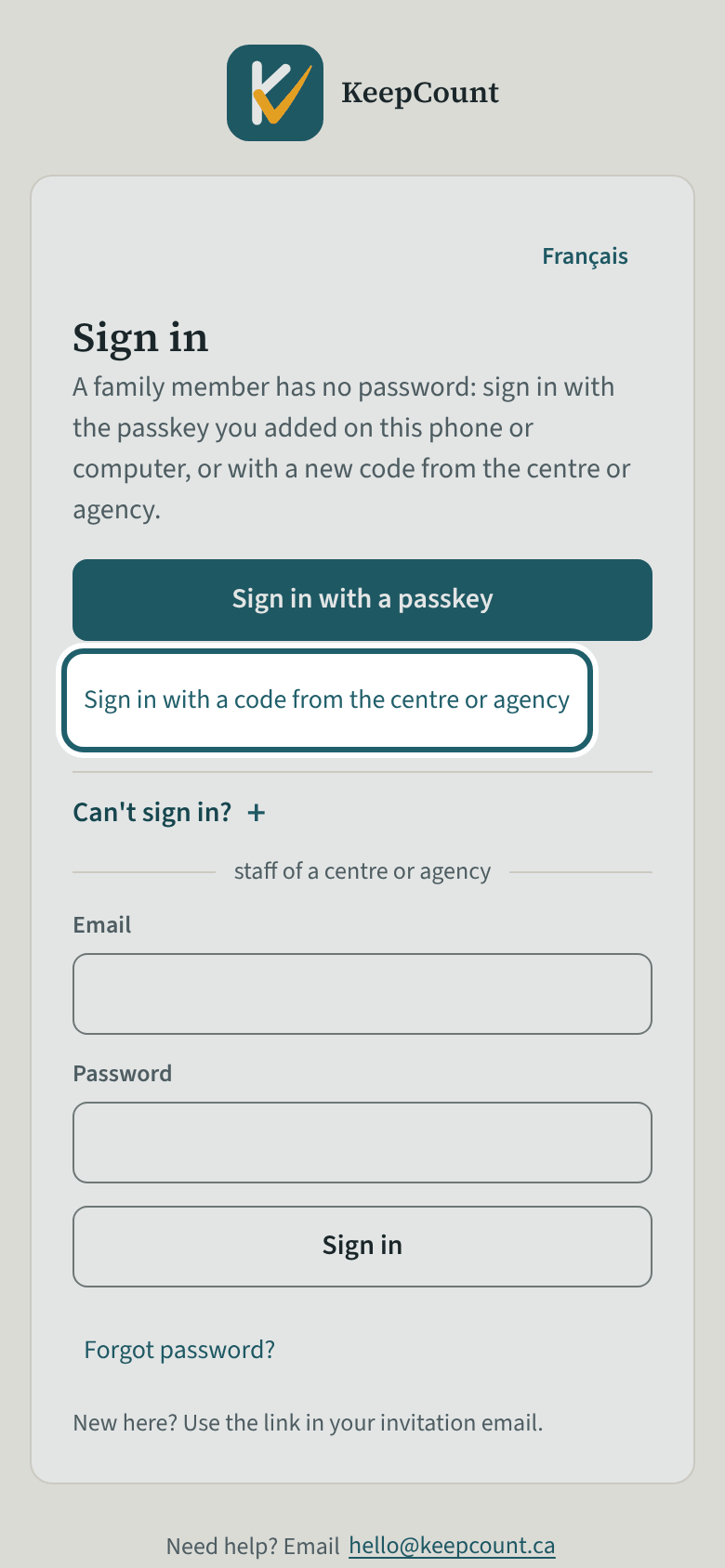
Next time, open keepcount.ca/family and tap Sign in with a passkey; without one, tap "Sign in with a code from the centre or agency" with a new code.
Watch out: A passkey on one phone does not sign you in on another: add one there too, or ask the centre for a new code. Lost the phone? Ask for a code and remove the old passkey under My account.
More about this
Open keepcount.ca/family, or a saved family page: the sign-in screen for families offers the passkey first and the code under it; the email and password form below is for the centre's staff and does not work for a family. Sign in on keepcount.ca's own home page opens the staff's sign-in instead: its last line, "Family member? Sign in with a code", is yours. A passkey added on one phone does not sign you in on another device: add one there too, under My account, or sign in with a new code. If you lose the phone, ask the centre for a code and remove the old passkey under My account.
Your child's centre or agency may use other words for people and its own policies; the screens are the same. The screen is from KeepCount 0.99.171, captured October 30, 2026 in a demonstration organization: everyone in it is fictional. Section numbers are O. Reg. 137/15 (General) under the Child Care and Early Years Act, 2014, read on e-Laws on October 20, 2026. This explains how KeepCount works; it is not legal advice, and the Ministry's program advisors decide compliance.