Step 24 of 26 · Your first week
Cover another room
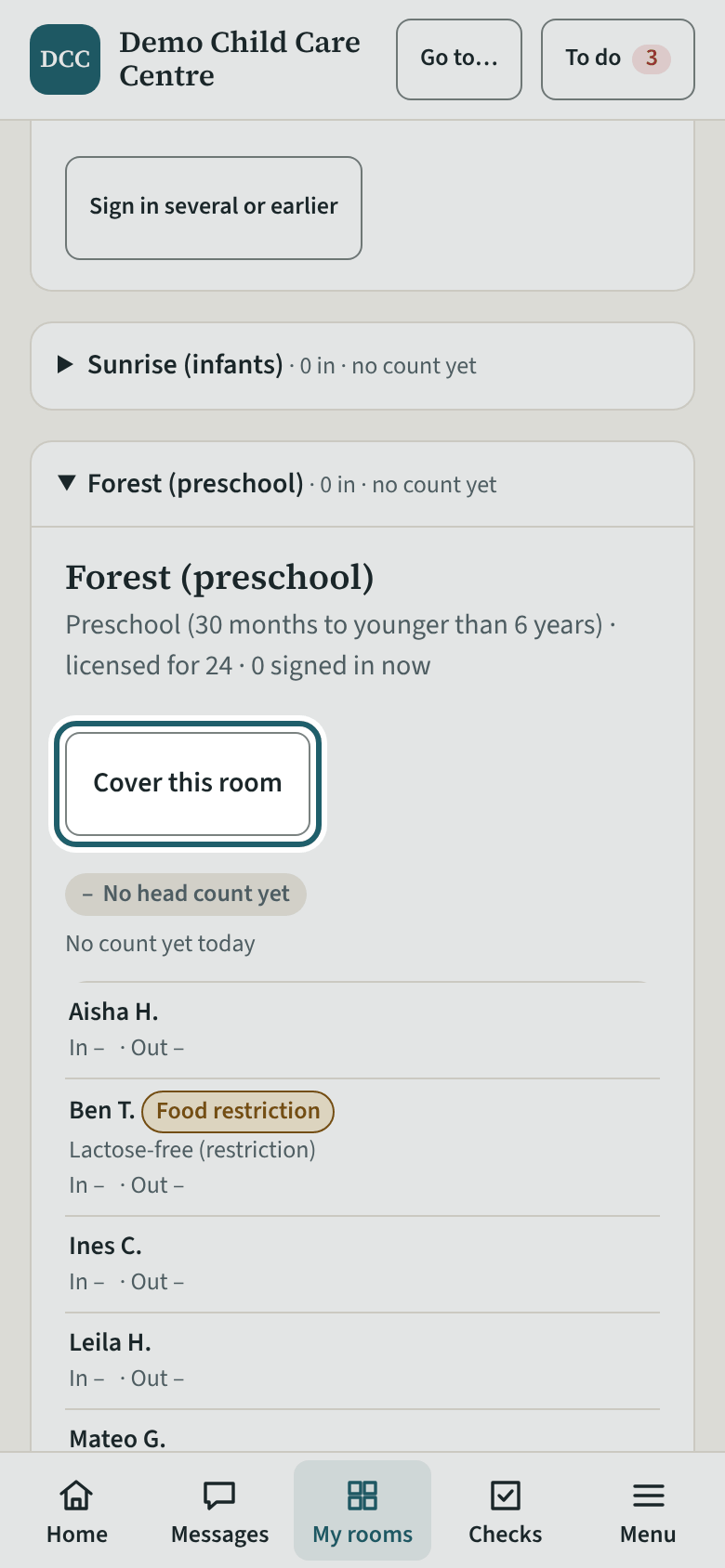
To record in a room that is not yours, open its card and tap "Cover this room"; give the reason, and "End my cover" when you leave.
Watch out: Until you cover a room, its card is read-only for you. The supervisor sees every cover at the site, with who, since when and why.
More about this
Covering is how a break, lunch, a ratio cover, help with a transition or an inspector's visit is recorded honestly: the cover shows who was in the room, from when, and why. The reasons offered are "Break cover", "Lunch cover", "Ratio cover", "Helping with a transition" and "Inspector or program advisor visit". The supervisor sees every cover at the site on Rooms ("Priya Dhaliwal is covering since 8:10 am (Break cover)").
Your centre's words for people and its policies may differ; the screens are the same. The screen is from KeepCount 0.99.144, captured October 27, 2026 in a demonstration organization: everyone in it is fictional. Section numbers are O. Reg. 137/15 (General) under the Child Care and Early Years Act, 2014, read on e-Laws on October 20, 2026. This explains how KeepCount works; it is not legal advice, and the Ministry's program advisors decide compliance.