Step 8 of 9 · Paying by pre-authorized debit
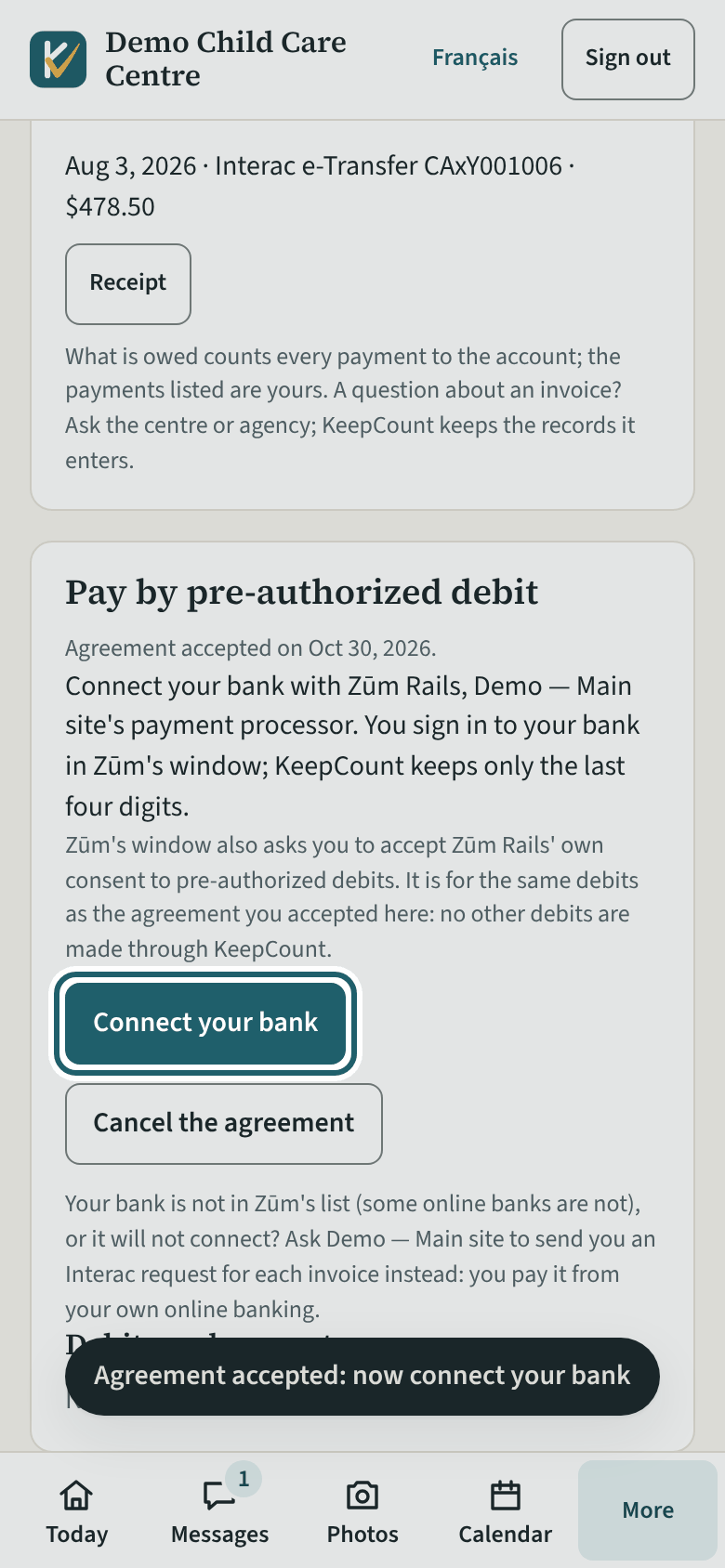
Connect your bank
After "I agree", "Connect your bank": you sign in to your bank in Zūm Rails' window, and KeepCount keeps only the last four digits.
Watch out: Your bank is not in Zūm's list, or will not connect? Ask the centre to send you Interac requests instead.
More about this
Zūm Rails is the centre's payment processor: it takes the debit from your bank into the centre's account at Zūm. Your bank sign-in is between you and Zūm's window; KeepCount never sees it. Once connected, the card says "Your bank" with the bank's name and "account ending" in its last four digits. "Connect another bank" changes it.
"Cancel the agreement" asks you to confirm: no more debits are made from that day, a debit already sent to the bank is cancelled if it still can be, and you pay the centre another way after that.
Your child's centre or agency may use other words for people and its own policies; the screens are the same. The screen is from KeepCount 0.99.171, captured October 30, 2026 in a demonstration organization: everyone in it is fictional. Section numbers are O. Reg. 137/15 (General) under the Child Care and Early Years Act, 2014, read on e-Laws on October 23, 2026. This explains how KeepCount works; it is not legal advice, and the Ministry's program advisors decide compliance.