Step 27 of 34 · Your first week
The waiting list
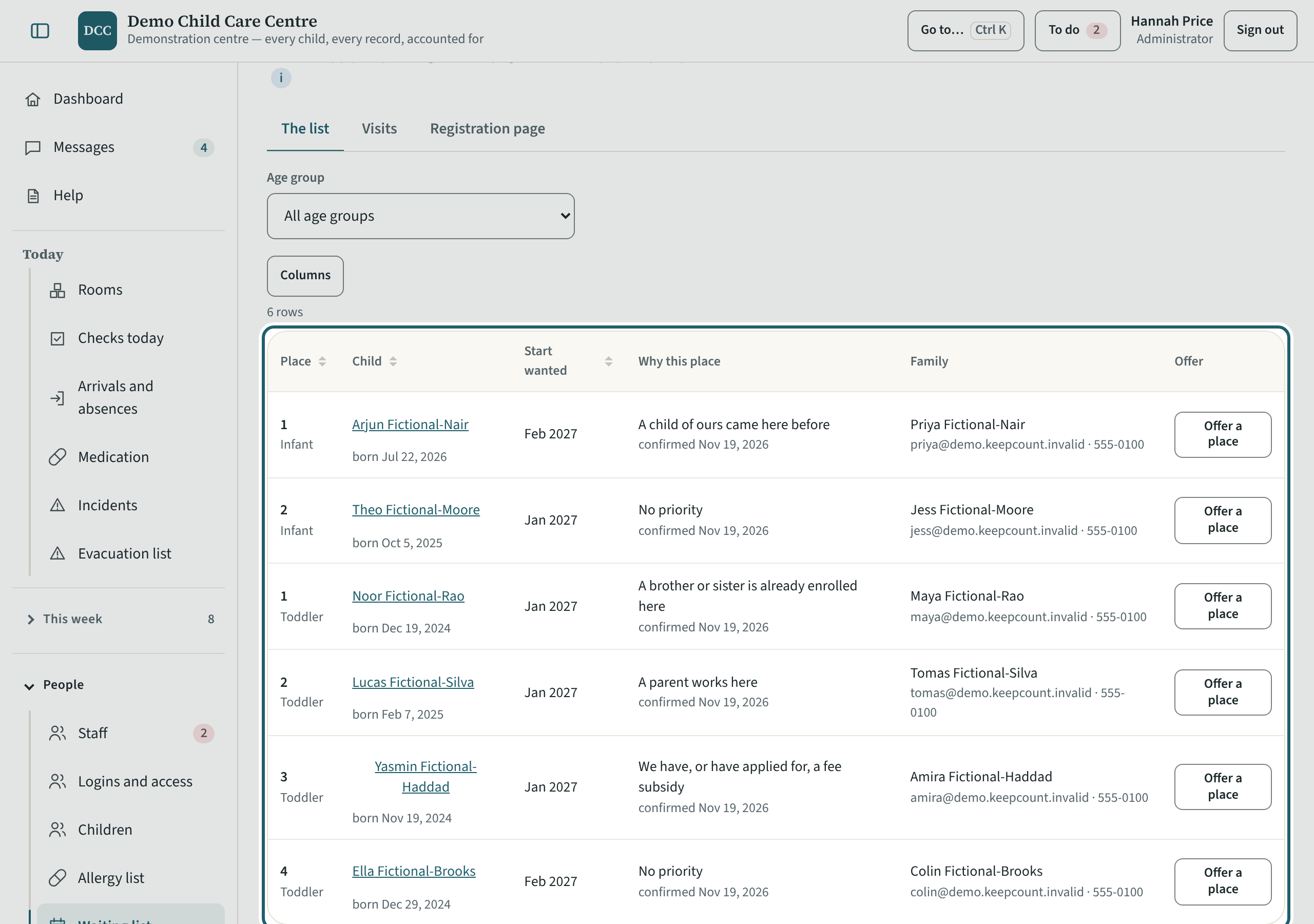
Waiting list, The list: each application in the order of offers, why it has its place, and "Offer a place".
Watch out: An online application is not the signed one: when a family accepts and you "Add as a child", the child's file still needs the application signed by a parent (s. 72(1)).
More about this
Families join your waiting list from your own page, by your link or QR code, and an application joins the list once the family confirms it from the link KeepCount emails. The list keeps the order your waiting-list policy sets out: the children with the first priority come first, then the second, and so on, and within each the date the family confirmed its application. Each row shows the place, the child, the start wanted, why this place (the priorities that apply, or "No priority"), the family and the offer. Your policy says how places are offered and lets a family see its child's place, privately (O. Reg. 137/15, s. 75.1(2)); no fee or deposit is charged for the list (s. 75.1(1)). Choose a child's name to see the application, its answers and its history; "Correct" changes it with a reason (it never moves a place) and "Remove from the list" ends it, with a reason.
"Offer a place" opens a form with a start date. KeepCount emails the family a link to accept or decline, and the time to answer starts when the email goes. Your policy offers the place to the first child of the age group whose start wanted is on or before the date; offering it to another child needs a reason, kept with the offer. The row then shows the offer: "Offered: answer by" a date, "Accepted: starts" a date, "Declined", "Offer expired" or "Withdrawn". On an open offer you can "Give more time" or "Withdraw the offer"; if the email did not go, "Send the email again". When a family accepts, "Add as a child" adds the child to your children, starting on the date, and takes them off the list. The "Possibly applied twice" mark shows where two applications look like the same child. In a demonstration no email goes, and the offer shows the link the family would have had.
Your centre's words for people and its policies may differ; the screens are the same. The screen is from KeepCount 0.99.309, captured November 19, 2026 in a demonstration organization: everyone in it is fictional. Section numbers are O. Reg. 137/15 (General) under the Child Care and Early Years Act, 2014, read on e-Laws on October 20, 2026. This explains how KeepCount works; it is not legal advice, and the Ministry's program advisors decide compliance.