Step 29 of 33 · Your first week
The calendar
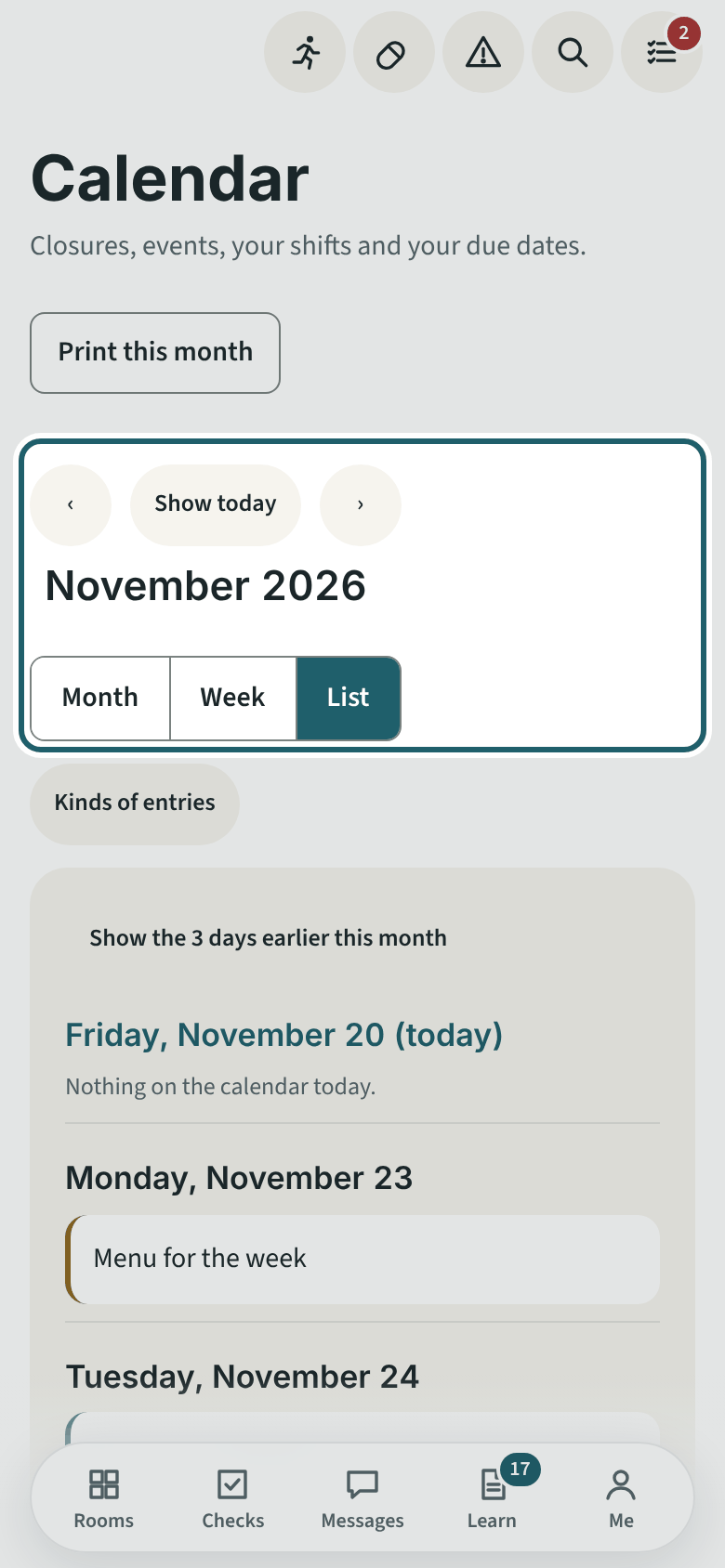
The calendar: closures and holidays, events, your shifts and your due dates, as a list, a week or a month.
Watch out: You read it; the office adds the events. No child is named on the calendar.
More about this
On a phone it opens on the list, from today; "Show today", the arrows, and Month, Week and List move around it. Tick or untick Closed and holidays, Program and families, Staff, Due dates, and Drills and safety to show or hide each kind. Tap an item for when, where, who sees it and where it comes from; a date from your own records has "Open the record". "Print this month" prints what staff see.
Under "In your own calendar", "Make my link" makes a private link that adds this calendar to Google, Apple or Outlook Calendar (add a calendar "from a URL"). Anyone with the link can read it, so keep it to yourself; "Make a new link" stops the earlier one, and "Turn it off" stops it altogether. It carries closures, holidays, events and your own dates, and no child's name.
Your centre's words for people and its policies may differ; the screens are the same. The screen is from KeepCount 0.99.312, captured November 20, 2026 in a demonstration organization: everyone in it is fictional. Section numbers are O. Reg. 137/15 (General) under the Child Care and Early Years Act, 2014, read on e-Laws on October 20, 2026. This explains how KeepCount works; it is not legal advice, and the Ministry's program advisors decide compliance.