Step 20 of 31 · Your first week
Resources and forms
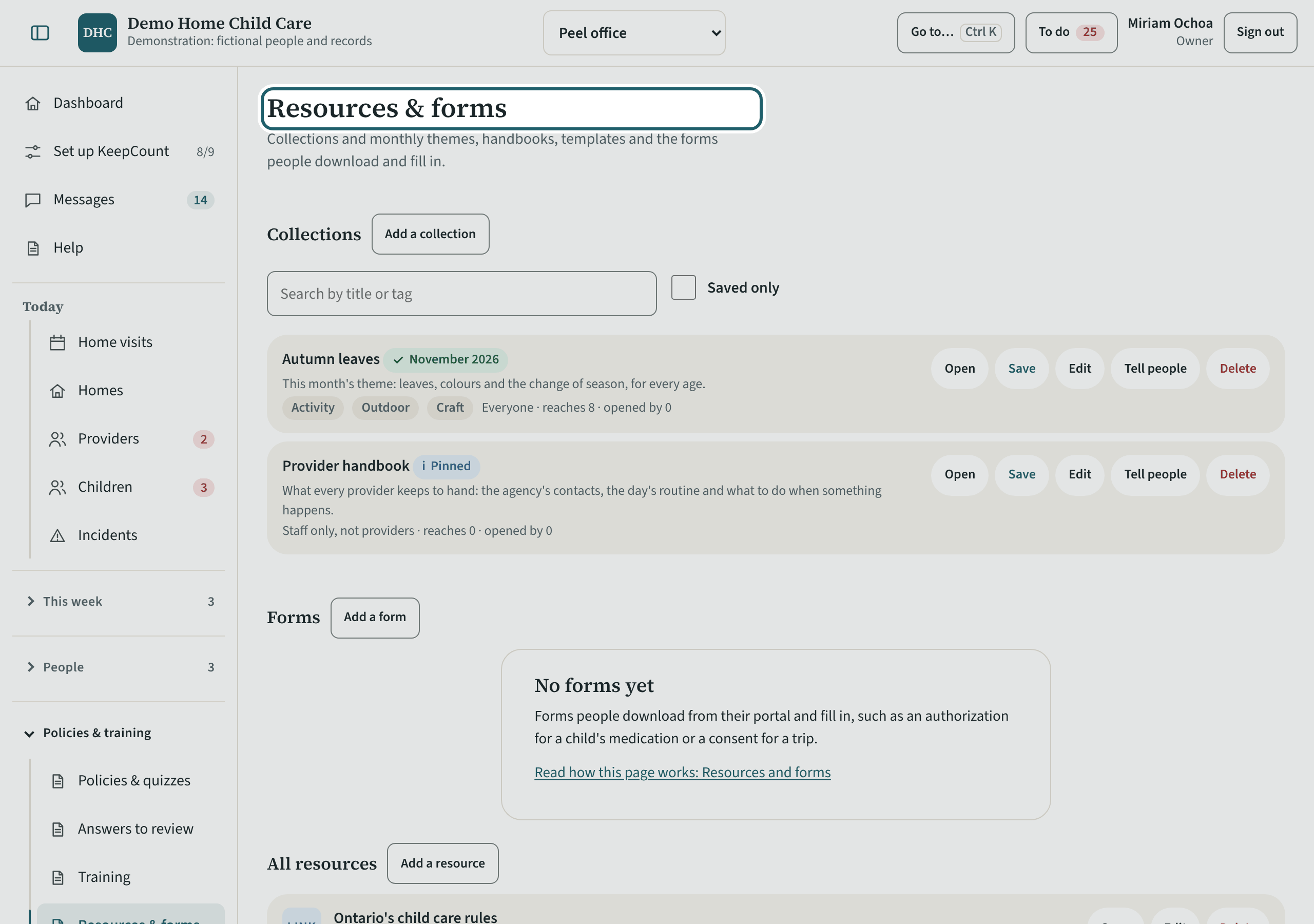
Resources & forms: the collections and this month's theme, the forms people download and fill in, and all the resources, each with Open, Edit and Delete.
Watch out: No personal information in a collection: never a child's or a family's name, photo or details. A downloaded form is not sent anywhere by KeepCount.
More about this
"Add a collection" gathers files, links, pictures and notes for providers and staff, for everyone, for staff only (not providers), or for chosen offices or homes (an office includes its homes). Give a collection a month to make it that month's theme on everyone's home screen; "Tell people" sends one message to those it reaches, and each collection shows how many it reaches and how many opened it.
"Add a form" and "Add a resource" take a title, a description, a category and a file (PDF, Word, PowerPoint, MP3 or a picture, up to 50 MB) or a link; a video goes in as a link. Each item shows its category and the day it was updated.
Your agency's words for people and its policies may differ; the screens are the same. The screen is from KeepCount 0.99.311, captured November 20, 2026 in a demonstration organization: everyone in it is fictional. Section numbers are O. Reg. 137/15 (General) under the Child Care and Early Years Act, 2014, read on e-Laws on November 12, 2026. This explains how KeepCount works; it is not legal advice, and the Ministry's program advisors decide compliance.