Step 11 of 21 · Each month
Give money back
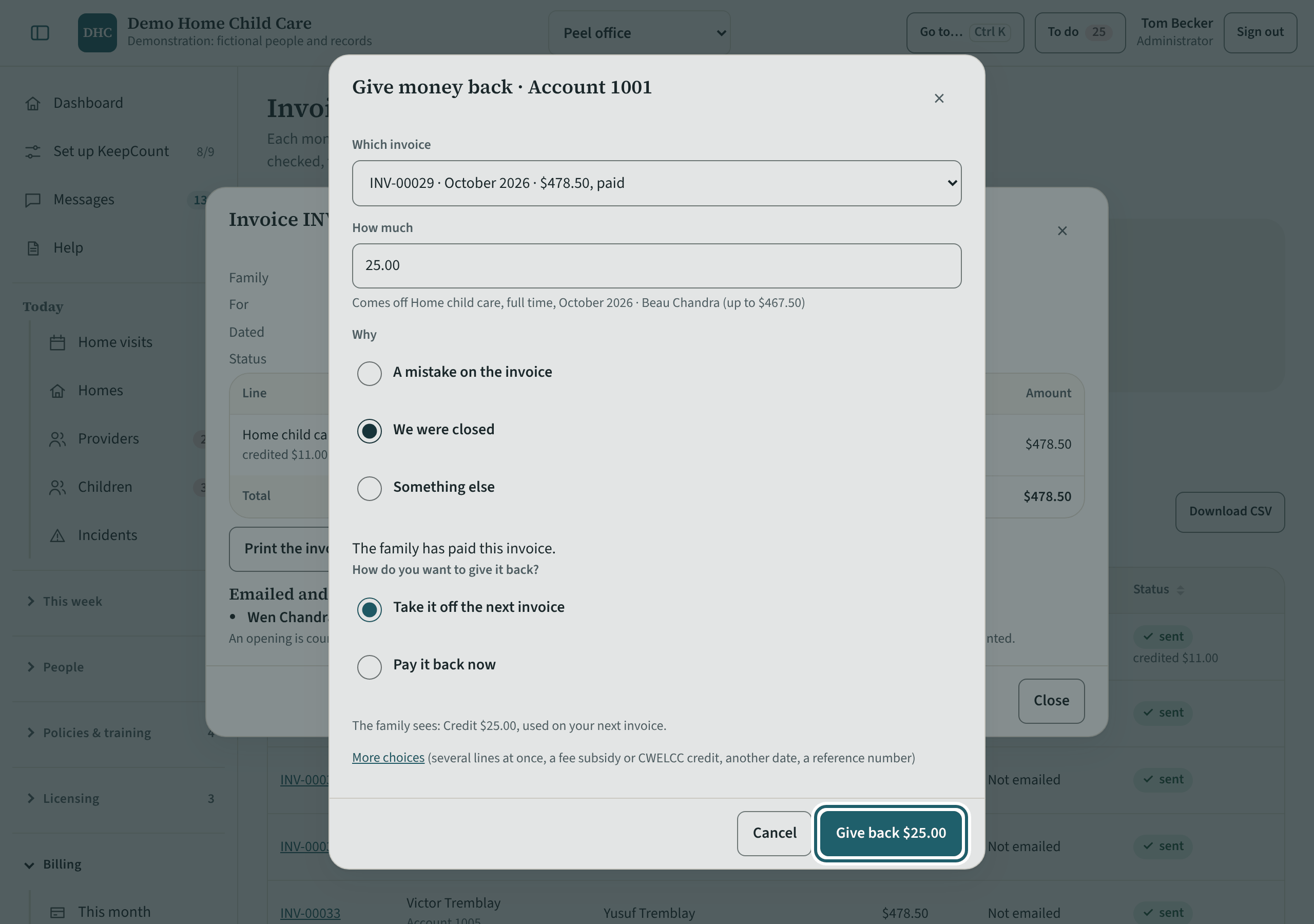
"Give money back": which invoice, how much and why. When the family has paid, take it off the next invoice or pay it back now.
Watch out: It is never more than what is left of a charge. "More choices" opens the full credit note: several lines at once, a fee subsidy or CWELCC credit.
More about this
"Give money back" is on a sent invoice and on the family's account history. The latest sent invoice is chosen; the amount comes off its care line (the line with the most left), and "Change which charge" picks another. Why: a mistake on the invoice, we were closed, or something else (say what; it is printed on the credit note).
When the family has not paid the invoice yet, the money comes off what it asks ("INV-00123 will ask $378.50 instead"), and the button is "Take $100.00 off". When the family has paid, the dialog asks how to give it back: "Take it off the next invoice" (the family's credit, used by the next invoice by itself) or "Pay it back now", to whoever paid (a choice when two family members pay): Interac or their bank, sent by KeepCount when the office takes payments through Zūm Rails, or "We sent it ourselves" by e-Transfer, cheque or cash today. One confirmation says how much, to whom and how. When the family will have no next invoice (the account is closed, or every fee ends this month), it is paid back now. If paying back fails after the credit note (Zūm refuses, the connection drops), the money is the family's credit: "Try again", or leave it for the next invoice.
"Record a change", under More on This month and at the foot of a family's account, lists what can change in a month, each choice opening the form that does it: a charge to add, a fee to take off or change, a payment returned or recorded by mistake, a funder's share, "<Month> is different" or "Something else". On a family's account, "We charged too much" and "The family paid too much or paid twice" open this dialog; from This month, Invoices or Family accounts opens first, to choose the family.
"Pay the credit back" on the account history opens the same dialog for a credit the family has already (paid twice, a credit carried over): leave it for the next invoice, or pay it back now. Its "More choices" is the full form: part of the credit, another date, a reference number.
"More choices" on a sent invoice opens the full credit note: why (a closure, the child left, an overpayment, fee subsidy approved, a CWELCC adjustment, a mistake on the invoice, or something else), an amount on each line up to what is left of it, and a memo printed on the credit note ("Closed October 14 for a water main break"). A second credit for the same lines asks why it is another one. "Withdraw the credit note" asks why and makes an invoice that charges its lines back: look it over, then send it.
With "The child left" chosen on an invoice with a child care fee, the dialog says to record the child's last day and use "Correct this invoice" instead: the new invoice bills the days of care up to that day by the organization's part-month rule. A credit by the days missed can differ from it by a few dollars, and the checks then list the invoice.
A credit note has its own number and prints like an invoice. What it credits becomes the family's credit with the organization when the invoice was already paid, and the next invoice uses it first.
Your centre's words for people and its policies may differ; the screens are the same. The screen is from KeepCount 0.99.309, captured November 18, 2026 in a demonstration organization: everyone in it is fictional. Section numbers are O. Reg. 137/15 (General) under the Child Care and Early Years Act, 2014, read on e-Laws on October 23, 2026. This explains how KeepCount works; it is not legal advice, and the Ministry's program advisors decide compliance.