Step 19 of 27 · Your first week
Resources and forms
Resources and forms: this month's theme, the collections that reach you, forms to download and the agency's reference material.
Watch out: Return a completed form to the agency as your home visitor directs: KeepCount does not send a downloaded form anywhere.
More about this
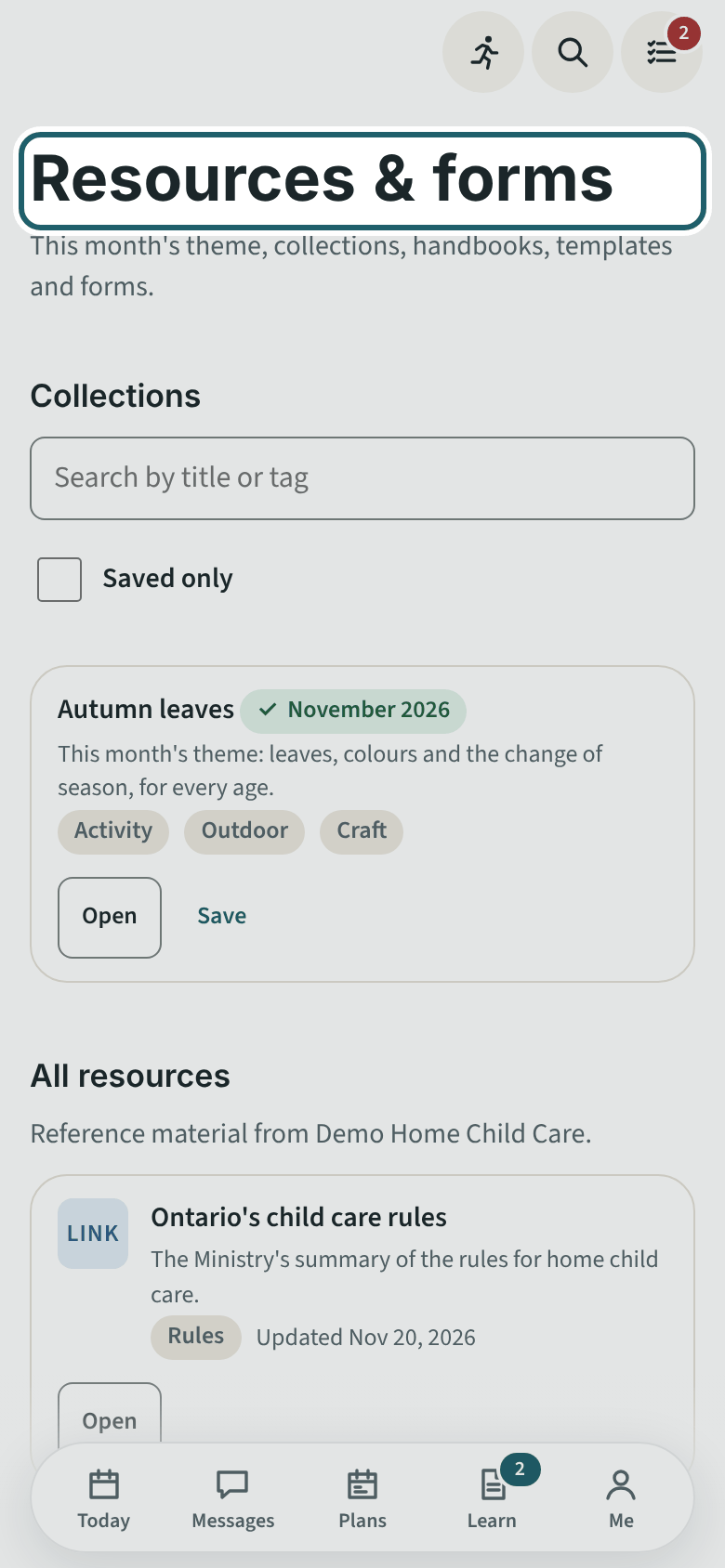
"This month" at the top names the collection the agency made the month's theme, with "Open it". Under Collections, each one the agency shares with you has "Open" and "Save"; "Saved only" shows the ones you saved, and the box searches them by title or tag. "Forms" lists what you can download ("Download form"); "All resources" lists the agency's reference material ("Open"), each with its category and the day it was updated. A link opens in a new tab: if nothing opens, allow pop-ups for KeepCount and try again. Where your agency asks you to confirm your policies first, Resources and forms and Training are greyed out in the menu until every policy is confirmed.
Your agency's words for people and its policies may differ; the screens are the same. The screen is from KeepCount 0.99.312, captured November 20, 2026 in a demonstration organization: everyone in it is fictional. Section numbers are O. Reg. 137/15 (General) under the Child Care and Early Years Act, 2014, read on e-Laws on October 20, 2026. This explains how KeepCount works; it is not legal advice, and the Ministry's program advisors decide compliance.